Tutorial Details
- Languages: HTML, CSS, Javascript
- Difficulty: Intermediate
- Estimated Completion Time: 30 mins
- Compatibility: Modern browsers (FF, Safari, IE9, Chrome, didn't check Opera) + IE6-8
Step 1: HTML <head>
The easy part…As we want our page to be compatible with IE 6-8, we use the “HTML – 4.01 Transitional” doctype. Let’s have a look at the template:
01 02 03 04 05 06 07 08 09 10 11 12 13 14 | <!DOCTYPE html PUBLIC "-//W3C//DTD HTML 4.01 Transitional//EN""http://www.w3.org/TR/html4/loose.dtd"><html lang="en"> <head> <meta http-equiv="Content-Type" content="text/html; charset=utf-8"> <title>testfile</title> <meta name="tutor" content="Bob de Ruiter"> <meta name="author" content="Your Name"> <!-- Date: 2011-07-07 --> </head> <body> </body></html |
Dead links are better than no links!Your web editor should have this template, otherwise copy this to index.php in your main folder.
We have three external files which we’ll create or add later. Like my great-grandfather always said: dead links are better than no links. pie.htc will be linked from the css file, so we only need to link the javascript and the css file.
1 2 3 4 5 6 7 8 9 | <head> <link href="tabs.css" rel="stylesheet" type="text/css"> <script type="text/javascript" src="tabs.js"></script> <meta http-equiv="Content-Type" content="text/html; charset=utf-8"> <title>testfile</title> <meta name="tutor" content="Bob de Ruiter"> <meta name="author" content="Your Name"> <!-- Date: 2011-07-07 --></head> |
Step 2: HTML <body>
This is the plan: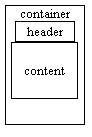
01 02 03 04 05 06 07 08 09 10 11 12 13 14 15 16 17 18 19 20 21 22 23 24 | <!DOCTYPE html PUBLIC "-//W3C//DTD HTML 4.01 Transitional//EN""http://www.w3.org/TR/html4/loose.dtd"><html lang="en"> <head> <link href="tabs.css" rel="stylesheet" type="text/css"> <script type="text/javascript" src="tabs.js"></script> <meta http-equiv="Content-Type" content="text/html; charset=utf-8"> <title>testfile</title> <meta name="tutor" content="Bob de Ruiter"> <meta name="author" content="Your Name"> <!-- Date: 2011-07-07 --> </head> <body> <div id="container"> <div id="header"> <ul><li><a rel="external" href="index.php">DSNR Home</a></li><li><a rel="external" href="protect.php">Protection</a></li><li><a rel="external" href="brain.php">Brainz!</a></li></ul> </div> <div id="content"> content </div> </div> </body></html> |
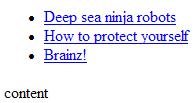
This is what we have so far:
It has all its functionality, but clients are never going to be happy with such a simple design. Good news for you..
Step 3: CSS CSS2 Only
So we need some basic styling. Create tabs.css and place it in the same folder as index.phpWe start with styling the body and the container:
01 02 03 04 05 06 07 08 09 10 11 12 | body { margin: 12px -12px; background-color: #003; font-family: Arial, "MS Trebuchet", sans-serif; font-size: 16px; width:100%;}#container { width: 800px; margin-left: auto; margin-right: auto;} |
The negative horizontal margin of the body isn’t that hard either. The width of the container is 800px for compatibility with old screens, but we are going to add rounded corners to them, each with a radius of 12px. This makes the corners shrink, so we add a padding of 12px to the container.
Step 4: Result Thus Far
Check what you’ve built so far. If the screen is too small (below 800px), you’ll notice the rounded borders at the left disappear. They are unnecessary so our negative margin tucks them nicely out of sight.To keep things readable, we should also change the background color of the content and the tabs.
1 2 3 4 5 6 | #header ul { background-color: #566AAA;}#content { background-color: #FFF;} |
Step 5: JavaScript Domready
Before we continue styling the tabs, we want to add one of the most important (and brilliant, though I say it myself) parts of this: the selected tab should be white. We aren’t going to change the tabs on every page. We let javascript do the dirty work.01 02 03 04 05 06 07 08 09 10 11 12 13 14 15 16 | if (document.addEventListener) document.addEventListener("DOMContentLoaded", function(){ran=1; init()}, false)else if (document.all && !window.opera){ document.write('<script type="text/javascript" id="contentloadtag" defer="defer" src="javascript:void(0)"><\/script>') var contentloadtag=document.getElementById("contentloadtag") contentloadtag.onreadystatechange=function(){ if (this.readyState=="complete"){ ran=1 init() } }}window.onload=function(){ setTimeout("if (!ran) init()", 0)} |
Step 6: JavaScript init()
Let’s create that init function. This function detects which tab you’re currently viewing, removes its hyperlink (the visitor is there already) and assigns a class.01 02 03 04 05 06 07 08 09 10 11 | function init() { el = function(q) {return document.getElementById(q)}; anchors = el("header").getElementsByTagName("a") for (a=0;a<anchors.length;a++) { if (anchors[a].href == window.location.href || anchors[a].href == window.location.href+"index.php") { anchors[a].removeAttribute("href") anchors[a].parentNode.className = "selected" break; } }} |
Step 7: JavaScript init() Breakdown
Allow me break it down for you.2 | el = function(q) {return document.getElementById(q)}; |
document.getElementById. It was useless this time, because I only used it once. But using it is a good habit to get into.3 4 | anchors = el("header").getElementsByTagName("a")for (a=0;a<anchors.length;a++) { |
5 | if (anchors[a].href == window.location.href || anchors[a].href == window.location.href+"index.php") { |
6 7 | anchors[a].removeAttribute("href")anchors[a].parentNode.className = "selected" |
selected class to this item, which doesn’t exist yet. Remember what my great-grandfather said.8 | break; |
This is what we have:
As you can see, the first link has changed to normal text.

Step 8: CSS Header and Content
OK, we’ve done the boring part. I’ve split the final styling in two parts: positioning and coloring.We need to center the header and set its width to 600px. We can use the same trick as we used with the container. The content layer is as big as the container (coincidence?), so no need to center it.
01 02 03 04 05 06 07 08 09 10 11 12 | #header { width: 600px; margin: 0 auto;}#content { background-color: #FFF; padding: 12px;}#header ul { background-color: #566AAA; margin:0;} |

Step 9: CSS Tab list
I’m sorry you had to wait this long for this part, but we made the necessary preparations and we are ready to roll. The tabs should be aligned horizontally and have the same width. The anchor tag should cover the whole tab.
01 02 03 04 05 06 07 08 09 10 11 12 13 14 15 16 17 18 19 20 21 22 23 | #header ul { background-color: #566AAA; margin: 0; width:600px; padding: 0; list-style-type: none; overflow: visible;}#header ul li { margin:0; padding:0; display: inline-block; width: 33.3%; /*customize this!!!*/ text-align: center; zoom: 1; *display: inline;}#header ul li a { width: 100%; height: 100%; display: block; padding: 12px 0;} |
If you’ve more or fewer tabs than 3, make sure you don’t forget to change the width of the list items!By default, the display of a list item is set to ‘list-item’ which is very similar to ‘block’, except for the marker. Block elements act like paragraphs and divs; they try to stay off the same line. Anchor tags and most markup tags (
strong, em) are inline elements. They don’t force a line break, but we can’t specify their width.But there’s a third display type: inline-block. Inline-block allows you to change the width, but it doesn’t force the line break. span elements are displayed as an inline-block by default.
That’s exactly what we’re looking for. But there’s one drawback. IE 6 doesn’t support inline-block.
zoom: 1; and *display: inline; take care of that. Only IE 6 and lower read rules starting with an asterisk.No padding and margin for the ul and list items. Our ‘Home’ tab aligns perfectly at the left side and the last tab aligns perfectly at the right.
This looks more like it…

Step 10: CSS Fancy Stuff
We made a clean design. It’s fine, but ze dezign zjould havé impacte, like an italian client once said. And I couldn’t have said it better myself.First you have to grab pie.htc from here. IE 6, 7 and 8 don’t support CSS 3, this is a fallback. Drop it in the public root folder of your site.
Step 11: CSS Gradients are Great
Instead of styling every list item, we give the whole list one big gradient and change the selected one back to white. Every browser type has a different prefix for gradients and CSS3pie expects the-pie- prefix.01 02 03 04 05 06 07 08 09 10 11 12 13 14 15 16 | #header ul { margin: 0; width:600px; padding: 0; list-style-type: none; overflow: visible; background-color: #566AAA; background: -webkit-gradient(linear, 0 0, 0 bottom, from(#9FB6CD), to(#003F87)); background: -moz-linear-gradient(#9FB6CD, #003F87); background: linear-gradient(#9FB6CD, #003F87); -pie-background: linear-gradient(#9FB6CD, #003F87); behavior: url(/PIE.htc);}.selected { background-color: #FFF;} |
The
background-color can stay. It’s a fallback for browsers which support neither CSS 3 nor pie.htc.Step 12: CSS Round Those Corners!
Three elements need to be rounded: the whole navigation bar, the selected tab and the content. And again, every browser type requires a prefix, but pie doesn’t this time.01 02 03 04 05 06 07 08 09 10 11 12 13 14 15 16 17 18 19 20 21 22 23 24 25 26 27 28 29 30 31 32 33 34 | #content { background-color: #FFF; -moz-border-radius: 12px; -webkit-border-radius: 12px; border-radius: 12px; padding: 12px; behavior: url(/PIE.htc);}(...)#header ul { -moz-border-radius: 12px 12px 0 0; -webkit-border-radius: 12px; border-radius: 12px 12px 0 0; margin: 0; width:600px; padding: 0; background-color: #566AAA; background: -webkit-gradient(linear, 0 0, 0 bottom, from(#9FB6CD), to(#003F87)); background: -moz-linear-gradient(#9FB6CD, #003F87); background: linear-gradient(#9FB6CD, #003F87); -pie-background: linear-gradient(#9FB6CD, #003F87); list-style-type: none; behavior: url(/PIE.htc); overflow: visible;}(...).selected { behavior: url(/PIE.htc); box-shadow: 0 -3px 3px -1px #222; -moz-border-radius: 12px 12px 0 0; -webkit-border-radius: 12px; border-radius: 12px 12px 0 0; background-color: #FFF;} |
We are almost done…

Step 13: Dark Theme
First we change the color of the text to dark blue, remove the underline and punish it with early hair loss:1 2 3 4 5 6 7 8 9 | #header ul li a { text-decoration: none; color: #005; font-weight: bold; width: 100%; height: 100%; display: block; padding: 12px 0;} |

01 02 03 04 05 06 07 08 09 10 11 | #header ul li a { text-decoration: none; color: #005; font-weight: bold; width: 100%; height: 100%; display: block; padding: 12px 0; text-shadow: 0 1px 1px #AAA; behavior: url(/PIE.htc);} |


No hay comentarios:
Publicar un comentario